Feature
A visual daily schedule your child can hear
My Day is the picture schedule inside Help Me Talk. You choose activity pictures for each day of the week and put them in order. Your child sees what comes next, and a tap on any picture says its name out loud. It helps with routines and gives your child words to talk about their day.
The short answer
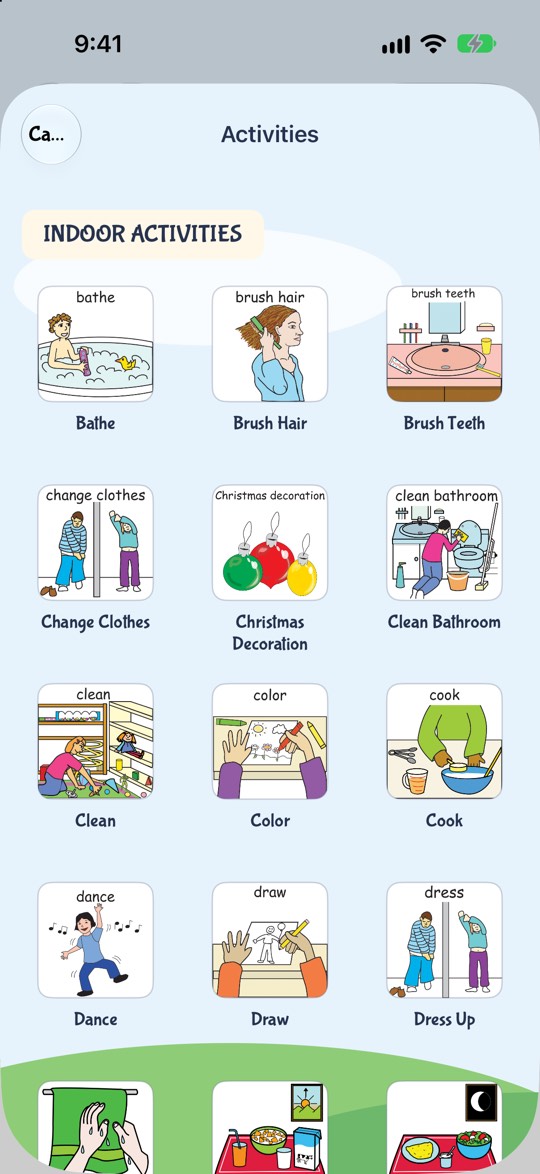
Open Explore, then My Day. Pick a day from Sunday to Saturday, tap +, and choose from 117 activity pictures (44 indoor, 73 outdoor). Put them in order with Edit. Your child taps a picture to hear it. It works on iPhone, iPad and Android, in English, and it is part of the Help Me Talk subscription.
US prices for iOS and Android. Prices vary by country; your store shows the price before you subscribe. The new prices are active on Google Play and take effect on the App Store on October 8, 2026.
Why a picture schedule helps
Many young children find changes hard when they can't see them coming. "Bath, then story, then bed" is a lot to hold in mind when it is only said out loud. A row of pictures stays in front of them, so they can check it again whenever they want.
Speech therapists and teachers often use picture schedules for this reason, especially with children who are late to talk or autistic. A schedule also gives a child words for their day. "Brush teeth" is easier to say when they have seen the picture and heard the words many times.
- Fewer surprises. Your child can see what happens next.
- Words for the day. Every picture has a name your child hears when they tap it.
- A topic to talk about. "What did we do after breakfast?" is easier with the pictures in front of you.
Watch it work
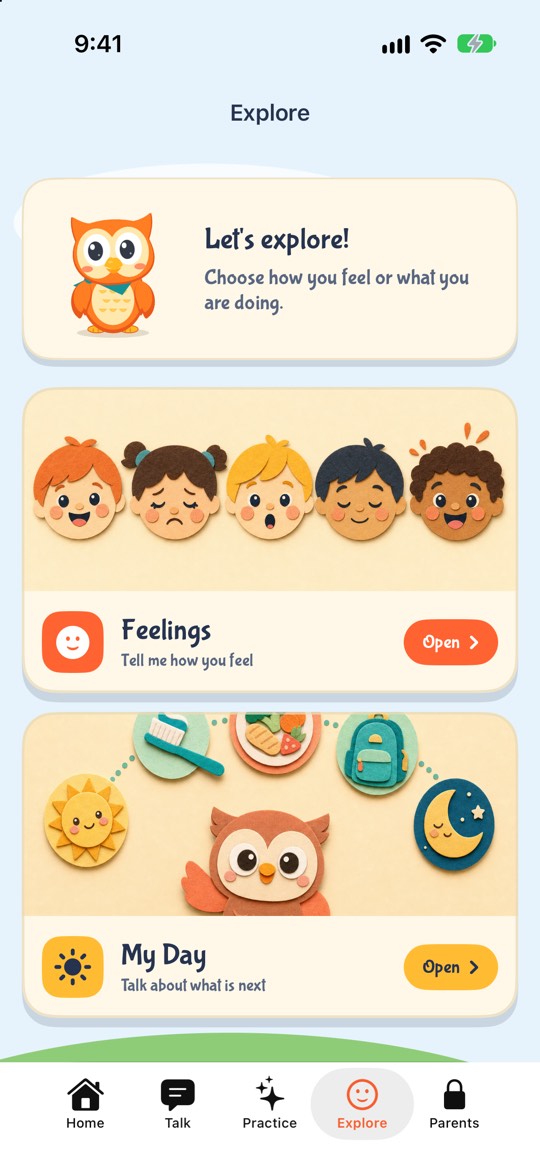
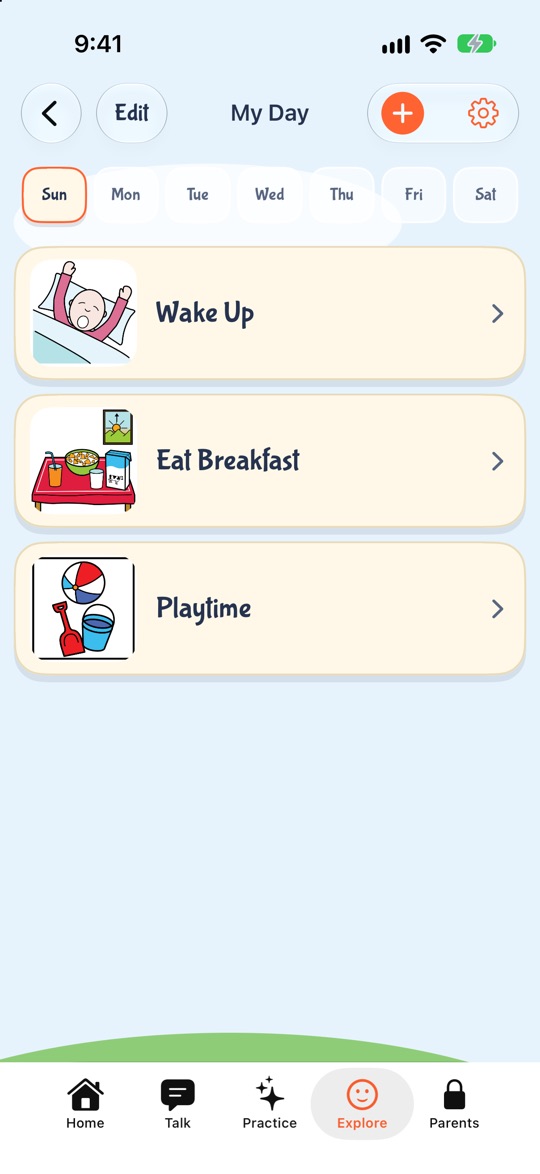
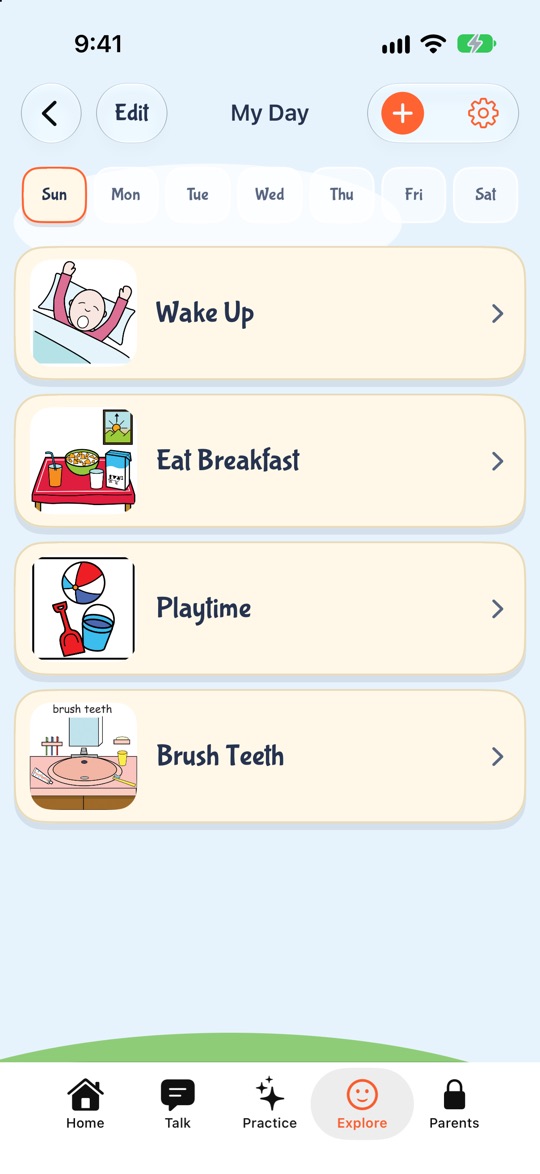
These are real screens from the app. A parent opens My Day, adds Brush Teeth to Sunday, and the child taps it to hear the words.
Inside the app
See how a parent builds a day
This is My Day in Help Me Talk. You pick activity pictures for each day of the week, and your child taps one to hear its name.
1. Open My Day
It sits in the Explore tab, next to Feelings.
Try it with your child. Free to download.
What you can do in My Day
| You want to | How |
|---|---|
| Plan a different day | Tap a day button from Sun to Sat. Each day keeps its own list. |
| Add an activity | Tap + and pick a picture. It goes to the end of the day. |
| Change the order | Tap Edit, then move the activities. |
| Remove one | Tap Edit and delete it. |
| Start the day over | Delete all, then confirm. The app asks first, because this can't be undone. |
| Hear an activity | Tap it. The app says its name out loud. |
The activity pictures
There are 117 pictures in two groups. The same pictures ship on iPhone, iPad and Android.
| Group | Pictures | Examples |
|---|---|---|
| Indoor activities | 44 | Bathe, brush hair, brush teeth, change clothes, cook, dance, draw |
| Outdoor activities | 73 | Go to school, go to the dentist, go to the supermarket, walk the dog, speech therapy |
How to use it at home
- 1Start with one part of the day, like the morning. Three or four pictures is enough at first.
- 2Build it with your child watching. Say each activity as you add it.
- 3Look at it together before you start. Tap each picture and let the app say it.
- 4As you finish each step, go back and ask "What's next?" Let your child tap the next picture.
- 5Keep the same order for a week. Routines work because they repeat.
- 6Add the rest of the day once the morning feels easy.
Problems and fixes
| What happens | Try this |
|---|---|
| Your child taps every picture again and again | That is fine. Hearing the words many times is the point. |
| The day changes at the last minute | Tap Edit and change the order with your child, so they see the change. |
| The list is too long to follow | Split it. Use only the morning or only bedtime for now. |
| Your child gets upset when a step is skipped | Show the change on the schedule before it happens, not after. |
What My Day does not do
It does not send reminders or alarms, and it does not tick off steps by itself. It is a picture list you look at together.
You can't add your own photos to My Day. Own photos work in Make Sentence, the picture board for building sentences.
The pictures and the voice are in English only. My Day is part of the subscription. You can try the whole app free for 3 days, then it is $9.99 a month or $49.99 a year in the US.
Questions parents ask
- What is a visual schedule?
- A visual schedule is a row of pictures that shows a child what happens during the day, in order. Help Me Talk has one called My Day, where each picture can also be heard out loud.
- How many activities can I choose from?
- Help Me Talk's My Day has 117 activity pictures: 44 indoor activities and 73 outdoor activities.
- Can I plan different days?
- Yes. My Day in Help Me Talk has a separate list for each day from Sunday to Saturday, so a school day and a weekend day can look different.
- Can I add my own photos to the schedule?
- Not in My Day. Help Me Talk lets you add your own photos in Make Sentence, the picture board for building sentences.
- Is it good for autistic children?
- Picture schedules are widely used with autistic children because they make the day easier to predict. Help Me Talk's My Day is a simple picture schedule with sound. It is not a therapy plan, so ask your child's therapist how to use it with their goals.
- Does it work on Android?
- Yes. My Day is in Help Me Talk on iPhone, iPad and Android, with the same 117 pictures. A subscription on one store does not carry over to the other.
- Does it send reminders?
- No. Help Me Talk's My Day shows the day's activities and reads them aloud when tapped. It does not send alarms or notifications for each step.
- Is it free?
- My Day is part of the Help Me Talk subscription. A 3-day free trial unlocks the whole app, then it is $9.99 a month or $49.99 a year in the US. Prices vary by country.
Keep reading
- Build a sentence with pictures
- Speech apps for autistic children
- Speech therapy at home
- Is my 2-year-old a late talker?
- Best speech apps for late talkers
- Help your child say how they feel
- A 4-week speech practice plan, made for your child
- The 18-month speech checklist
Last updated 21 October 2026.