Guide
How to use a visual schedule at home
A visual schedule is a row of pictures that shows your child what happens next. It works best when it is small, matches the real day, and gets used every time, not only on hard days. This guide shows how to pick the first routine, how many pictures to use, how to teach your child to check it, and what to do when the day changes.
The short answer
Start with one routine, like the morning or bedtime. Use 3 to 5 pictures in the real order. Build it with your child watching and say each step out loud. Before you start, look at it together. After each step, ask "What's next?" and let your child point or tap. Keep the same order for about a week, then add the next part of the day. When plans change, change the pictures first, then tell your child.
US prices for iOS and Android. Prices vary by country; your store shows the price before you subscribe. The new prices are active on Google Play and take effect on the App Store on October 8, 2026.
What a visual schedule is, and why it helps
Words are gone the moment you say them. A picture stays. When you tell a child "bath, then story, then bed", they have to hold three things in mind and keep them in order. With pictures, they can look again whenever they want.
That is why speech therapists and teachers use picture schedules so often, especially with children who are late to talk or autistic. A schedule makes the day easier to predict. It also gives a child words for their day. "Brush teeth" is easier to say after seeing the picture and hearing the words many times.
A schedule is not a reward chart and not a list of rules. It only answers one question: what happens next?
- Fewer surprises. Your child can see the next step before it starts.
- Easier changes between activities. "The picture says shoes" is easier to accept than another request from a parent.
- New words. Each picture has a name your child hears again and again.
- Something to talk about. "What did we do after lunch?" is easier with the pictures in front of you.
Pick the right kind of schedule
There is more than one way to show a day with pictures. Pick the one that fits your child now. You can move to a longer one later.
| Type | What it looks like | Good for |
|---|---|---|
| First, then | Two pictures: "First shoes, then park" | Young children, or a child who finds one step hard |
| Routine strip | 3 to 5 pictures for one part of the day | Mornings, bedtime, getting ready to leave |
| Part of the day | Morning, afternoon or evening as one list | Children who already follow a short strip |
| Whole day | Every main activity from wake-up to bed | Older children, school holidays, busy days |
| Week view | A different list for each day | Children who ask "Is it a school day?" |
Step 1: Choose one routine to start
Pick a routine that happens every day and that is often a bit hard. Mornings and bedtime are the usual choices. Avoid starting with something rare, like a trip to the dentist. Your child needs many repeats before the schedule feels normal.
Write down what really happens now, in order. Not what should happen. If your child always has a drink before brushing teeth, put the drink in. A schedule that matches real life is one your child will trust.
Step 2: Choose the pictures
Use one picture for each step. Clear and simple is better than pretty. The picture should show the action, like a toothbrush for brushing teeth or pyjamas for getting dressed for bed.
Use the same word for a step every time. If the picture says "bath", do not call it "wash time" one night and "tub" the next. Your child is learning the link between the picture and the word.
| Choice | Paper pictures | Pictures in an app |
|---|---|---|
| Set up | Print, cut, sometimes laminate | Pick from a list on the phone or tablet |
| Change the order | Move the cards by hand | Tap Edit and move them |
| Hears the word | Only if you say it | Some apps say the word when tapped |
| Goes with you | Easy to lose cards | Goes wherever the phone goes |
| Screen time | None | A few taps, then put the device away |
Step 3: Build it with your child
Let your child watch you make the schedule. Say each step as you add it: "First, get dressed. Then breakfast. Then shoes." If your child is ready, let them place a picture or two. Children trust a plan more when they helped make it.
Put a paper schedule at your child's eye level, near where the routine happens. A morning strip can go by the bedroom door. A bedtime strip can go in the bathroom.
Step 4: Teach your child to check it
A schedule only helps if your child looks at it. At first, you will need to bring them to it every time. This is the part most families skip, and it is the part that makes it work.
- 1Before the routine starts, look at the whole schedule together. Point to each picture and say it.
- 2Start the first step.
- 3When it is done, go back to the schedule. Mark it done: turn the card over, move it to a "done" pocket, or point and say "done".
- 4Ask "What's next?" Wait a few seconds. Let your child point, tap or say it.
- 5If they do not answer, point to the next picture and say it for them. No pressure.
- 6Repeat until the routine is over. End with a short "All done!"
Step 5: Keep it the same, then grow it
Use the same schedule, in the same order, for about a week. Routines work because they repeat. If you change it every day, your child is learning a new list each time.
Once your child goes to the schedule on their own, or says the next step before you ask, it is time to grow it. Add the next part of the day, or move from "first, then" to a short strip.
| Sign | What it means | What to do |
|---|---|---|
| Your child looks at the schedule without being asked | They trust it | Add the next part of the day |
| Your child says or taps the next step | They know the order | Let them lead more of the routine |
| Your child ignores it every time | It may be too long or too new | Cut it down to 2 or 3 pictures |
| Your child gets upset at the schedule | It may feel like a list of demands | Add a fun step they like near the end |
When the day changes
Changes are where a schedule helps most, and also where it can go wrong. The rule is simple: change the pictures before the change happens, and show your child.
Say it plainly: "Today is different. No park. We go to Grandma's." Swap the picture while your child watches. If something is cancelled at the last minute, go to the schedule first, show the change, then explain. Children cope better with a change they can see.
Some families add a "surprise" or "something new" picture. It tells the child that a step will be different, without needing to say what yet.
Problems and fixes
| What happens | Try this |
|---|---|
| Your child ignores the schedule | Make it shorter. Bring them to it before every step for a week. |
| Your child takes the cards off or taps every picture | That is fine at first. They are exploring. Hearing the words many times helps. |
| Your child melts down when a step is skipped | Show the change on the schedule before it happens, not after. |
| The list is too long to follow | Split it. Use only the morning or only bedtime for now. |
| Your child only wants the fun step | Use "first, then". Put the fun step right after the hard one. |
| The schedule worked, then stopped | Check it still matches the real day. Routines drift over time. |
| Two parents do it differently | Agree on the words and the order. The same words every time matter. |
Using My Day in Help Me Talk
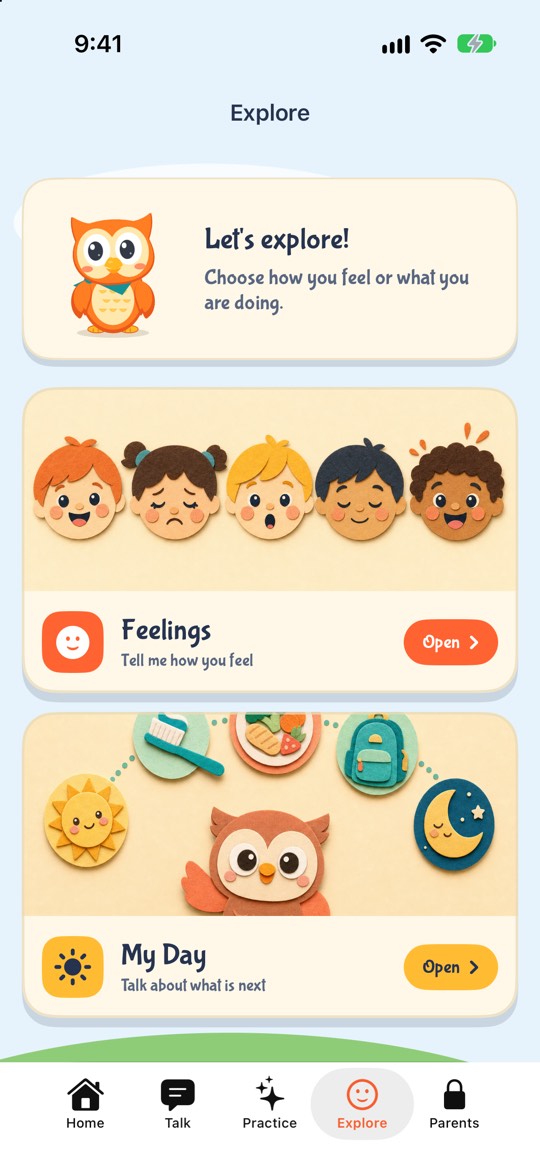
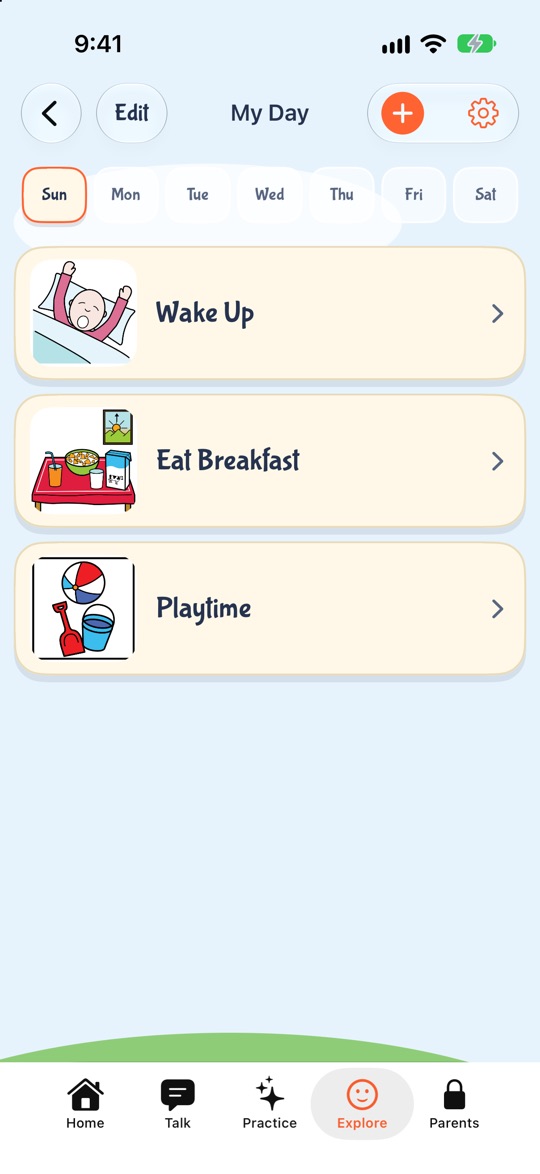
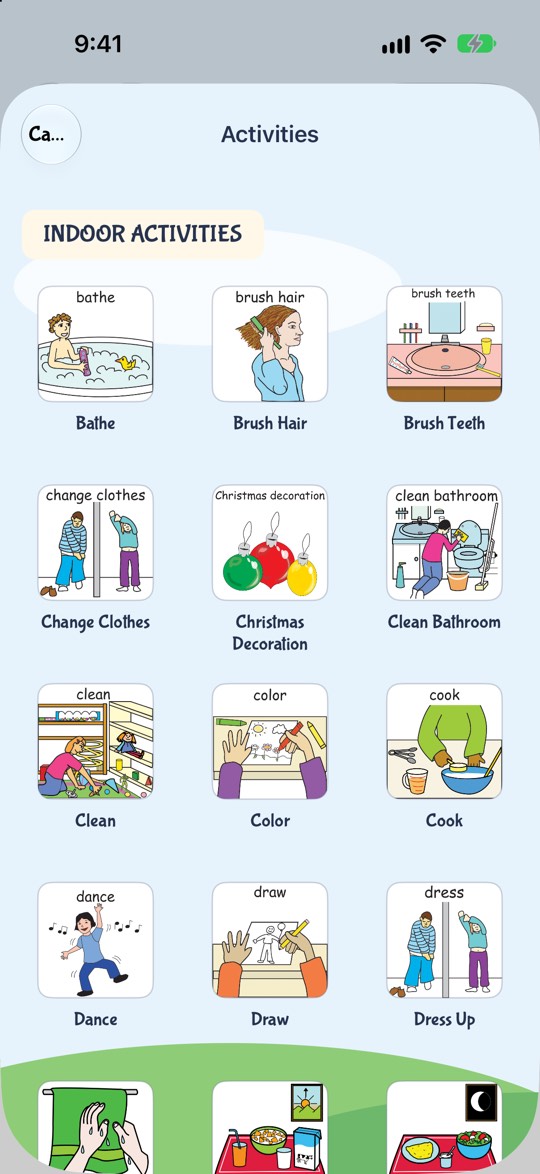
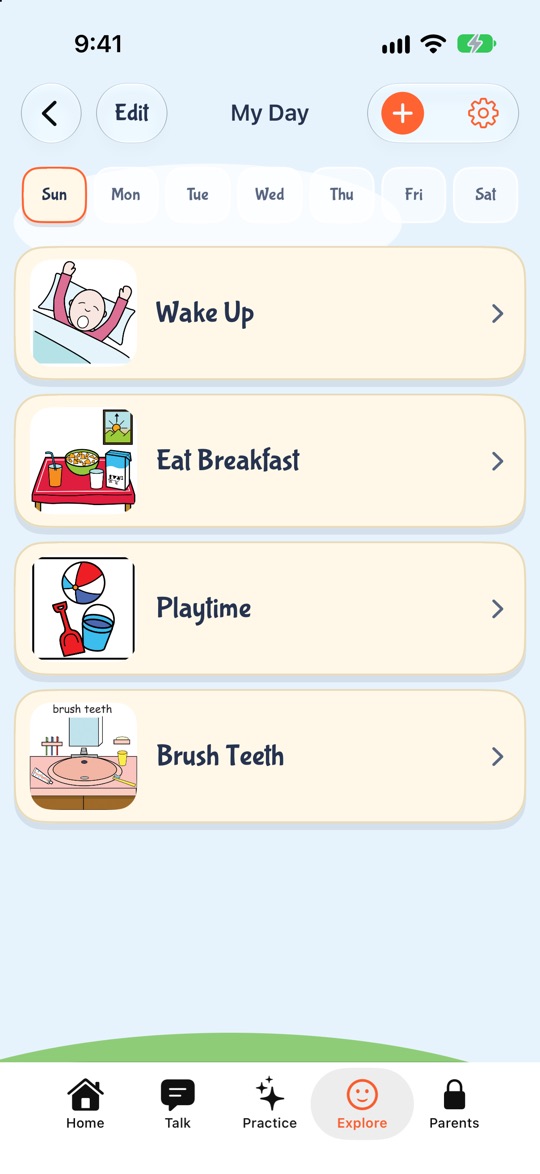
Help Me Talk has a picture schedule called My Day. Open Explore, then My Day. Pick a day from Sunday to Saturday, tap +, and choose from 117 activity pictures (44 indoor, 73 outdoor). Tap Edit to change the order or remove a step. When your child taps a picture, the app says its name out loud, so they hear the word each time they check the schedule.
Each day of the week keeps its own list, so a school day and a weekend day can look different. It works on iPhone, iPad and Android, in English.
My Day does not send reminders or alarms, and it does not tick steps off by itself. It is a picture list you look at together. You can't add your own photos to My Day. Own photos work in Make Sentence. My Day is part of the Help Me Talk subscription. You can try the whole app free for 3 days, then it is $9.99 a month or $49.99 a year in the US.
Inside the app
See how a parent builds a day
This is My Day in Help Me Talk. You pick activity pictures for each day of the week, and your child taps one to hear its name.
1. Open My Day
It sits in the Explore tab, next to Feelings.
Try it with your child. Free to download.
When to ask for help
A schedule is a tool for daily life, not a treatment. If your child struggles with most changes in the day, has very few words for their age, or has big meltdowns that do not ease with routines, talk to your doctor or a speech-language pathologist. If your child already sees a therapist, ask how a schedule can fit their goals.
Help Me Talk is a practice app, not a diagnosis or a replacement for a licensed speech-language pathologist. If you are worried about your child’s speech, talk to your doctor or an SLP. This app is for the practice in between.
Questions parents ask
- At what age can a child use a visual schedule?
- Many children can use a simple two-picture "first, then" schedule from around age 2. Longer strips usually work once a child can follow a short routine with help. Start small and grow it as your child gets used to it.
- How many pictures should a visual schedule have?
- Start with 3 to 5 pictures for one routine, or just 2 for a "first, then" board. Add more once your child checks the schedule without being asked.
- Should I use photos or drawings?
- Either works if the picture clearly shows the action. Some young children understand real photos more easily. What matters most is using the same picture and the same word for a step every time.
- How long before a visual schedule works?
- It depends on the child. Plan on about a week of using the same schedule, in the same order, every day, and bringing your child to it before each step. Many children start checking it on their own after that.
- Do visual schedules help autistic children?
- Picture schedules are widely used with autistic children because they make the day easier to predict and changes easier to accept. Ask your child's therapist how to fit a schedule to their goals.
- What if my child refuses to follow the schedule?
- Make it shorter, add a step your child likes near the end, and use "first, then" for the hard part. A schedule that feels like a list of demands will be ignored, so keep it about what happens next, not about rules.
- Is there an app for a visual schedule?
- Help Me Talk has one called My Day, with 117 activity pictures and a separate list for each day of the week. A tap on a picture says its name out loud. It is part of the Help Me Talk subscription, on iPhone, iPad and Android.
Keep reading
- My Day: the visual schedule in Help Me Talk
- Speech apps for autistic children
- A feelings board for kids
- Speech therapy at home
- Is my 2-year-old a late talker?
- The 18-month speech checklist
- The 2-year-old speech checklist for your child
- The 3-year-old speech checklist for your child
Last updated 30 October 2026.